
Card Assignment: Who Owns Each Idea After the Workshop
Give every card an owner while the group is still together, so the workshop ends with a clear handover instead of an open question.
Running a workshop soon? Book a free facilitator demo and we will set it up with you.
Overview
A workshop produces a board full of good ideas, a ranking everyone agreed on, and a shared feeling that something will now happen. Two weeks later the question comes up in a status meeting: who was going to take care of that? Nobody quite remembers.
Card assignment closes that gap. In IdeaClouds you give every card an owner in the session where the decision was made. The name stays on the card, follows it into the later phases, and shows up in every export you send around afterwards.
Assignment is a facilitator tool. As the facilitator you decide who owns which card, on the whiteboard during the workshop or on the result page once the evaluation is done. Participants see the owner on the card, but they cannot change it. The person you pick gets told, both inside the session and by email, so nothing depends on someone taking notes.
The feature is deliberately small. There are no due dates, no status columns and no progress tracking. IdeaClouds hands over a clear list of owned outcomes and leaves the tracking to whatever system your team already uses.
Assigning a card
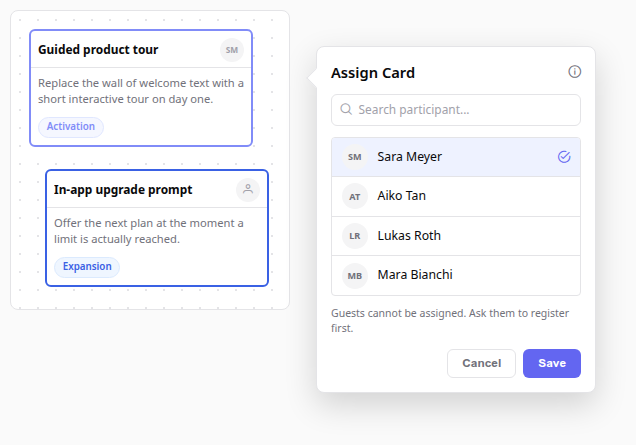
Every card carries an avatar slot in its top right corner. A card without an owner shows a neutral person icon, a card with an owner shows that person’s initials or profile picture. As facilitator, click the slot to open the assignment dialog.
The dialog lists everyone who can take a card in this session:
- Type in the search field to narrow a long participant list by name or email address.
- Click a person to select them, then confirm with Save.
- Click the person who is already selected to remove the assignment again, then Save.
- You appear in the list yourself, so you can take a card as the facilitator.
Guests are not in the list. A guest joins without an account and without an email address, so there is no way to reach them with a reminder afterwards. If someone in the room needs to own a card, ask them to register first, then assign it.
One place where the avatar stays quiet is the evaluation phase. While the group is rating cards, assignment is switched off on purpose, so nobody starts distributing work in the middle of a vote.
What the new owner sees
The moment you save, the assignee gets a notification inside the session, with two shortcuts: jump straight to the card, or narrow the board down to everything assigned to them.
If they are not in the session at that moment, they hear about it in the daily digest email instead.
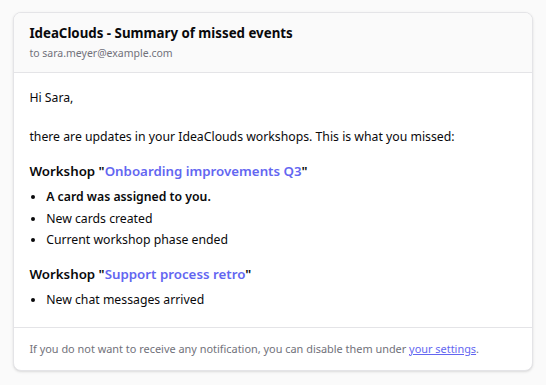
The digest deliberately keeps quiet about the details. It says that a card was assigned, not which card and not by whom. Card content stays inside the workshop, which matters when a session contains sensitive material and the email leaves your organisation’s inbox. Whoever gets the mail follows the workshop link to see what it is about.
Anyone who finds that too noisy can switch the reminder off under their account settings, with the toggle Card assigned to me. The assignment itself stays, only the email stops.
The result page
This is where assignment earns its keep, because the result page is what you walk through at the end of a workshop.
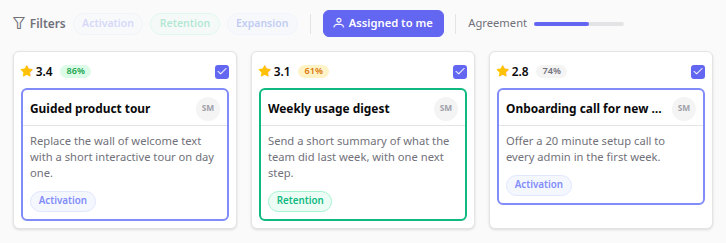
Every result card shows its owner next to the score and the agreement badge. On top of the page you get an extra filter, Assigned to me, next to the category filters. It appears only for people who actually own something in this session, so participants without a card never see a filter that would return an empty page.
The filter combines with the others. Turn on Assigned to me, click the category Retention, and you see your own cards in that category, nothing else. For a participant leaving the workshop, that is the shortest possible answer to “what did I just sign up for”.
The action plan
Below the results, IdeaClouds builds a plan out of everything that has an owner.
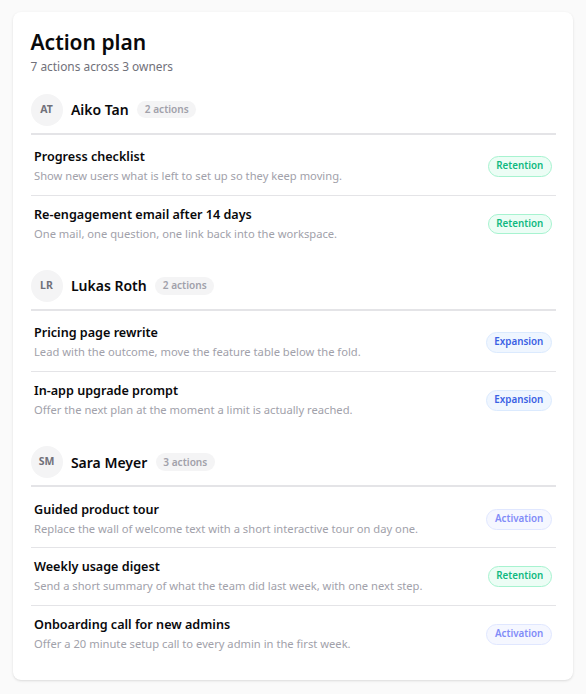
The panel groups the cards by person, sorted by name, and shows how many actions each owner walked away with. Under every card title you see its first line of content, so the plan reads on its own without going back to the board.
One detail worth knowing: the action plan ignores the filters above it. Whatever you have narrowed the page down to, the plan always shows every assigned card in the session. It is meant to be the complete handover, not a view of your current selection. Read it out at the end of the workshop and everyone hears their own name and their own list.
The panel only appears when at least one card has an owner. A session where nothing was assigned simply does not show it.
Assignments stay with the card
If your workshop continues into further phases, the cards you carry forward keep their owners. You do not reassign anything after a phase change, and an idea that survives three rounds of selection arrives at the end with the same name on it that it had at the start.
In the exports
Owners are part of every export format, so the handover works even for people who were not in the session.
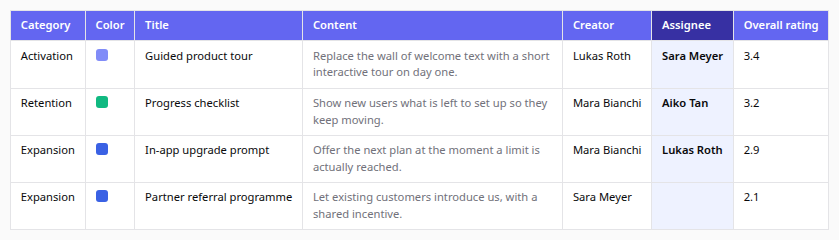
The spreadsheet export gets a dedicated Assignee column next to the creator, empty for cards nobody took. The document exports write the owner underneath the card, and the PDF result page draws the same avatar you see on screen. Wiki, mindmap and feed exports carry the name as well.
That makes the export a usable status document. Send the XLSX to a project lead who missed the workshop and they can sort by owner without asking anyone what happened.
Practical tips for facilitators
- Assign before the energy drops: The best moment is right after the evaluation, when the ranking is fresh and everyone is still in the call. Ownership discussed a day later by email takes ten times as long and produces vaguer answers.
- Let people volunteer, then record it: Ask who wants a card rather than distributing them yourself. The dialog is fast enough to keep up with a spoken round, and people commit differently to something they picked.
- Leave the weak cards unowned on purpose: An empty avatar slot is information. If the top three ideas all found an owner and the rest did not, that tells you something honest about the group’s priorities.
- Watch the balance in the action plan: The owner counts make it obvious when one person collected six actions and everyone else took one. Rebalance it in the room, not four weeks later.
- Do not assign to guests, plan for it: If you know beforehand that some participants will own results, ask them to register instead of joining as guests. It takes a minute at the start of the workshop and saves the awkward moment at the end.
Want to see this in your own workshop?
Bring your next workshop to a 30-minute session with us. We will set it up together in your IdeaClouds account, so you leave with a session ready to run and every result already owned by someone.